

What are HubSpot lifecycle stages?
HubSpot lifecycle stages track every contact from first touch to loyal customer across eight fixed values: Subscriber, Lead, Marketing Qualified Lead, Sales Qualified Lead, Opportunity, Customer, Evangelist, and Other. Setting up lifecycle stages gives sales and marketing a shared definition of progress, enables automated nurture sequences, and produces the data you need to calculate conversion rates, spot bottlenecks, and make confident pipeline decisions without chasing someone for an update.

HubSpot lifecycle stages track every contact from first touch to loyal customer, giving your sales and marketing teams a shared language and a clear process for moving people through the pipeline.
If you've never set up lifecycle stages before, the concept can feel abstract. In practice, it's one of the most valuable things you can configure in HubSpot, because it turns a vague notion of "where is this lead?" into a precise, reportable answer your whole team can act on.
This post introduces you to lifecycle stages in HubSpot and walks through practical examples to help you implement them at your company.
What are lifecycle stages in HubSpot?
HubSpot lifecycle stages are a fixed set of eight values that track where a contact sits in your customer acquisition process. The Lifecycle Stage property is built into HubSpot and cannot be modified.
The eight stages are:
- Subscriber: A contact who has opted in to hear from you, typically through a blog or newsletter.
- Lead: A contact who has shown interest beyond a subscription, such as filling out a form.
- Marketing Qualified Lead: A lead marketing has identified as worth nurturing toward a sales conversation.
- Sales Qualified Lead: A lead sales has reviewed and accepted for direct outreach.
- Opportunity: A contact with an active deal in progress.
- Customer: A contact who has purchased.
- Evangelist: A customer who actively refers others to your business.
- Other: A catch-all for contacts who don't fit the above stages.
Because the picklist is fixed, you cannot rename stages (for example, changing "Sales Qualified Lead" to "Sales Accepted Lead"). What you can do is define exactly what each stage means for your business, which is where the real work happens.
Timestamps and automation
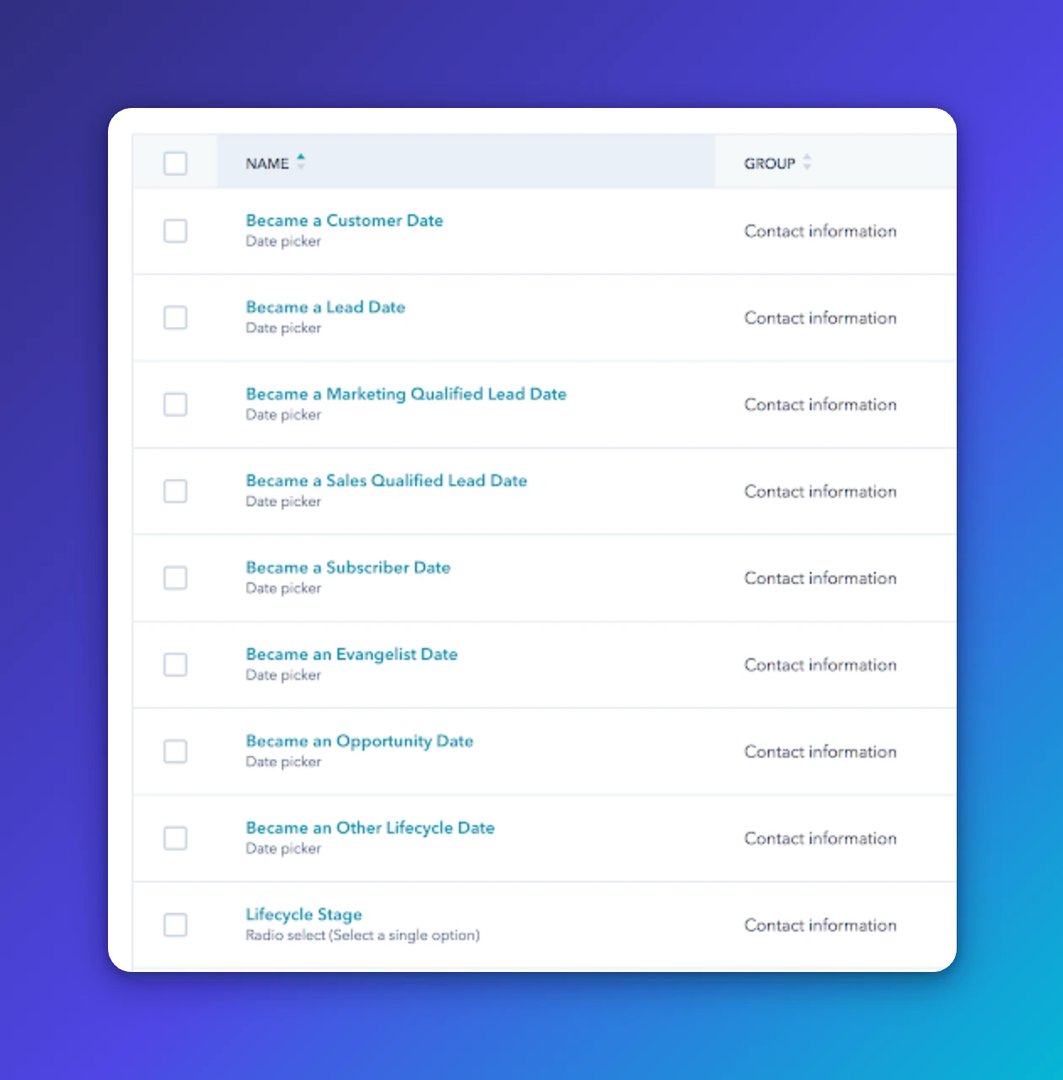
Every lifecycle stage has a corresponding timestamp property that HubSpot updates automatically when a contact reaches that stage:
- Became a Subscriber Date
- Became a Lead Date
- Became a Marketing Qualified Lead Date
- Became a Sales Qualified Lead Date
- Became an Opportunity Date
- Became a Customer Date
- Became an Other Date
These timestamps are more than bookkeeping. They give you the data to calculate how long contacts spend at each stage, spot bottlenecks, and measure whether your process is actually moving people forward.
Lifecycle stages on contacts and companies
The Lifecycle Stage property exists on both the Contact and Company objects. Think through how you want to handle both, because edge cases come up quickly. A company might already be at the "Customer" stage when a new contact enters at "Opportunity." That's a normal scenario, especially in enterprise accounts where you're selling into multiple departments.
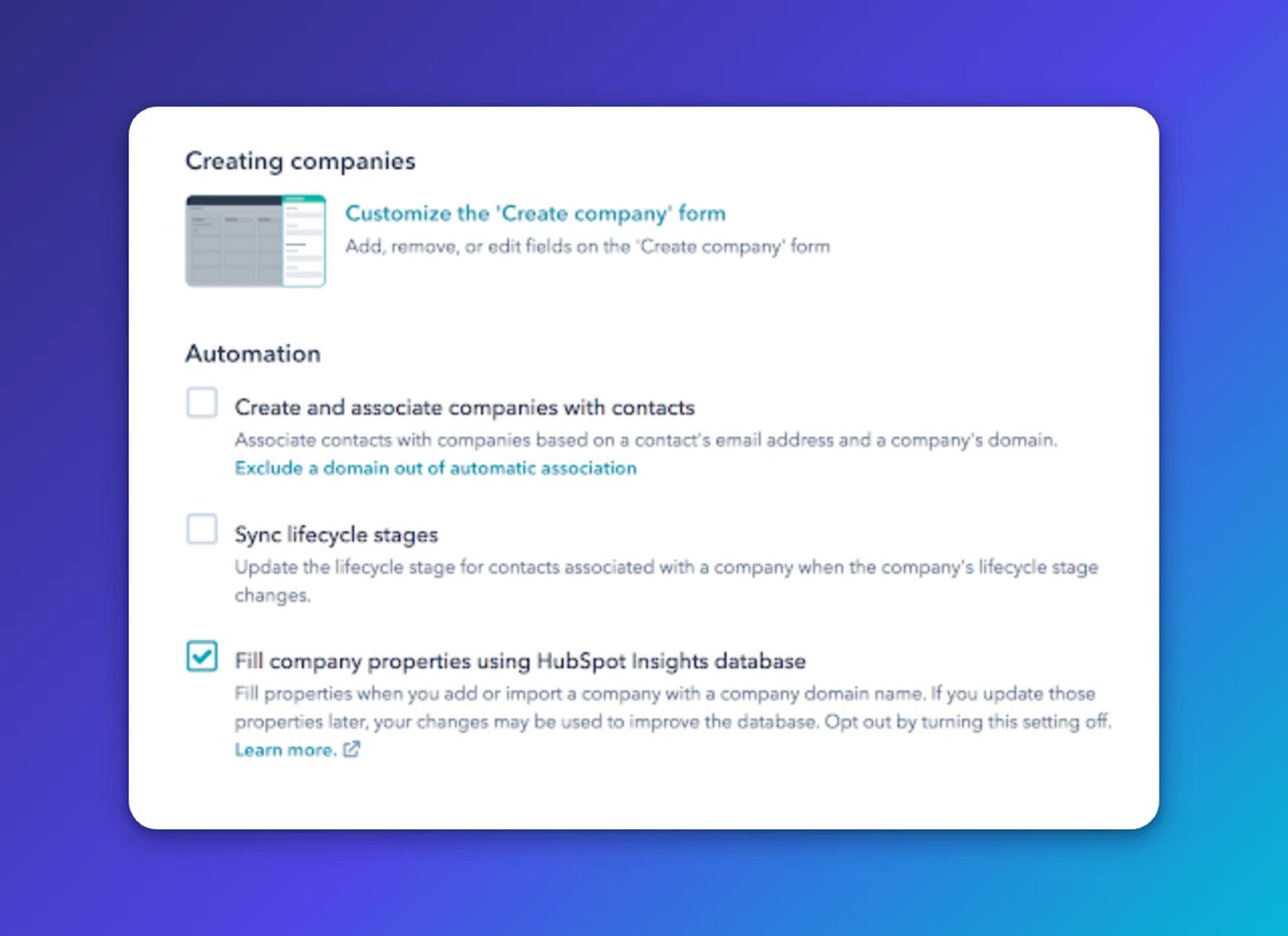
HubSpot addresses this with a "Sync lifecycle stages" option on the Company object. When enabled, setting a Company to "Customer" automatically applies that stage to all associated contacts, including ones added after the fact.
Why lifecycle stages matter for your business
Lifecycle stages answer the question every leader on a lean team eventually asks: "Where do we actually stand with our pipeline?" Without a structured lifecycle, that answer lives in someone's head, a spreadsheet, or a patchwork of notes. With one in place, it's a number you can pull up in seconds.
The stages also give sales and marketing a shared definition of progress. That matters more than it sounds. When both teams agree on what "MQL" means and what has to happen before a contact moves to "SQL," you stop having the same argument every quarter.
More practically, lifecycle stages let you stop waiting to be asked and start knowing. Instead of pulling a report when someone requests it, you can set up views and alerts that surface what's changing without anyone having to check.
For a deeper look at implementation, see how to deploy lifecycle stages in HubSpot.
Create custom dashboards for you and your team.
Get started with KlipsWhat sales and marketing processes do lifecycle stages support?
Lifecycle stages are the foundation for four core processes. The exact setup will vary by business model, but these are the areas where the structure pays off most clearly.
Setting up a lead nurturing process
Each lifecycle stage represents a milestone in the customer journey, which makes it a natural trigger for nurture sequences. A basic example: set up an automated nurture for all new Subscribers with the goal of moving them to the Lead stage. Build the content around whatever action defines "Lead" at your company, whether that's a demo request, a content download, or a product page visit.
Combine lifecycle stage with other HubSpot properties like persona, industry, or role, and you can run segmented, personalized nurtures based on exactly where someone is in the funnel. The result is outreach that feels relevant instead of generic, without your team manually deciding who gets what.
Monitoring lead quality and quantity
The MQL stage is the handoff point between marketing and sales. Marketing nurtures a contact to MQL; sales decides whether to act on it. If your sales team is working toward a monthly revenue target, they need to know how much pipeline to build, and that means knowing how many MQLs marketing needs to generate.
Lifecycle stage data makes that calculation possible. Instead of estimating, you can look at historical conversion rates and work backwards from the revenue number to the top-of-funnel volume required. That's a conversation you can have with confidence, backed by your own data rather than a guess.
Optimizing conversion rates between stages
When you're not hitting revenue targets, lifecycle data gives you somewhere to start looking. Two metrics are especially useful here.
The MQL to SQL conversion rate is a leading indicator of lead quality. If sales is rejecting a high percentage of MQLs, the leads aren't meeting the bar, and you need to look at how MQL is defined or what's driving contacts to that stage.
The MQL to Opportunity conversion rate is a lagging indicator of lead quality. It takes longer to measure, but it's a stronger signal. If MQLs are converting to opportunities at a healthy rate, your pipeline is in good shape. If they're not, you have a direction to investigate.
These two metrics alone can tell you whether you have a volume problem, a quality problem, or both.
Lead management and contact ownership
Lifecycle stages give sales and marketing a shared framework for deciding what happens to a contact at each stage. Who owns them? What's the next action? When does ownership transfer?
Here's an example of how that plays out at the MQL stage:
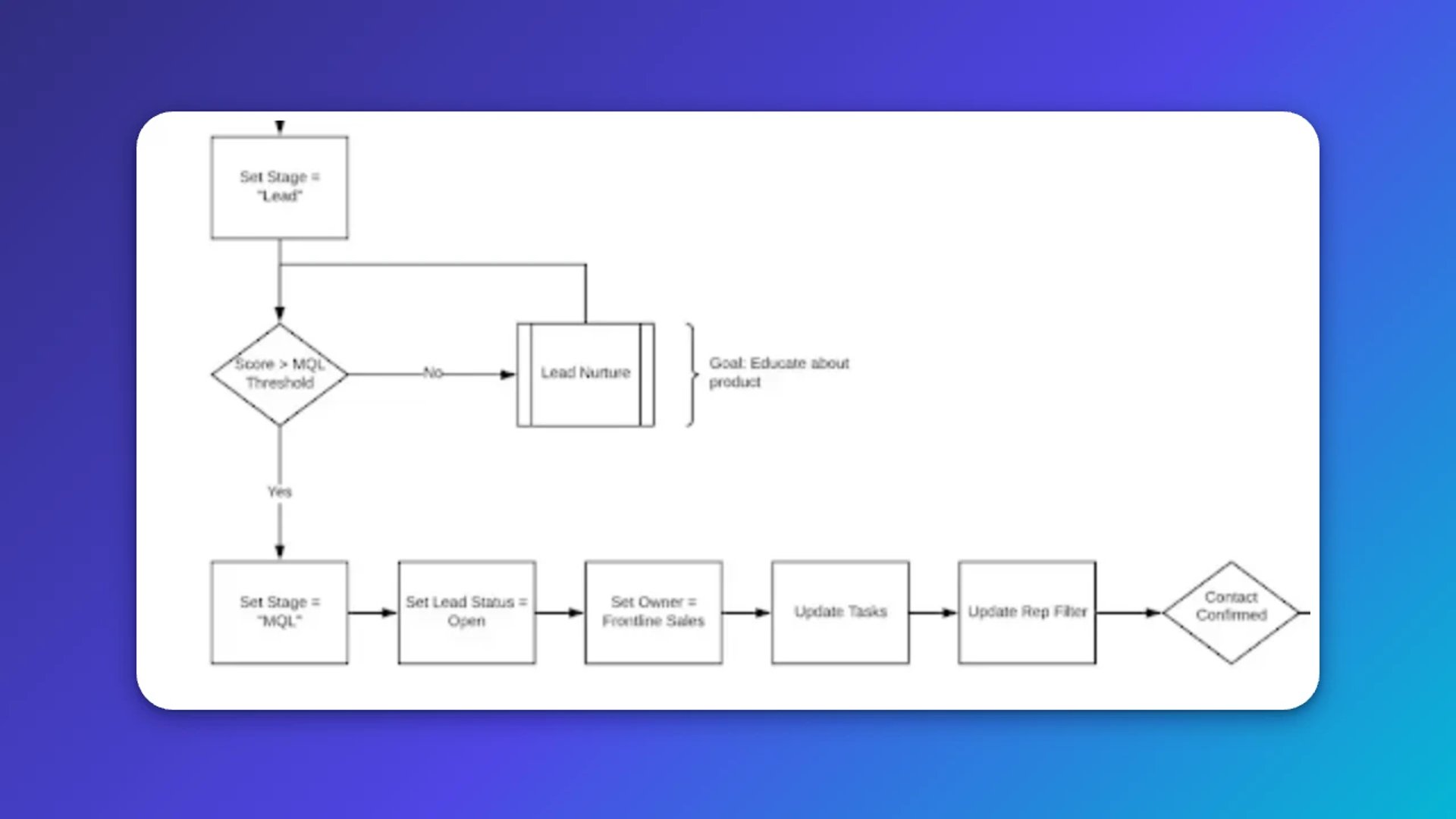
The process typically covers:
- Setting the lifecycle stage based on defined criteria
- Using lead scoring to trigger the MQL designation automatically
- Setting a lead status to communicate where the contact sits within the stage
- Assigning contact ownership so the right person is responsible
- Adding tasks so follow-up happens on time
When this is documented and automated, your team stops relying on memory or manual handoffs. The process runs, and everyone knows what to do next.
Create custom dashboards for you and your team.
Get started with KlipsGetting reliable numbers from your lifecycle data
Lifecycle stages are only as useful as the data behind them. If the definitions are vague or inconsistently applied, the numbers won't reflect reality, and decisions made from them won't hold up.
The goal is a setup where you can look at your lifecycle data and trust what you see. That means clear criteria for each stage, automation that applies those criteria consistently, and a shared understanding across sales and marketing of what each stage actually represents.
When that's in place, you're not pasting numbers into a spreadsheet or chasing someone for an update. You know where your pipeline stands, which stages are moving, and where contacts are stalling. That's the kind of clarity that lets a small team make decisions with the same confidence as a much larger one.
Published 2026-08-21



Most recent
- AUG 11Beyond simple sign-ups: how True Trials and Activation predict growth
- JUL 7Why business leaders miss important trends in their dashboards
- JUN 19The best chart for the job: Visualizing data for non-technical users
- JUN 95 tips to understand (and organize) your restaurant data
- MAY 26Think in Horizons, Not Seconds
- MAY 2010 Cloud BI Dashboard Tools for Small Businesses in 2026