Google Search Console
Google Search Console is a free Google tool that lets website owners and marketers monitor their site's presence in Google search results, track top queries, and identify technical issues.
Connect Google Search Console to Klipfolio to build live dashboards that track clicks, impressions, rankings, and CTR — without manual exports.
Tracking your site's search performance shouldn't require manual exports or tab-switching between tools. Connect Google Search Console to Klipfolio and get your rankings, clicks, and impressions in one live dashboard.
What is Google Search Console?
Google Search Console is a free Google tool that lets website owners and marketers monitor their site's presence in Google search results, track top queries, and identify technical issues.
Key data you can track includes:
Top search queries: The keywords driving traffic to your site
Clicks, Impressions, and Click-Through Rate (CTR): Performance metrics for every query and page
Internal and external links: How your site is connected and referenced
Crawl and indexing status: Whether Google can access and index your content
Google Search Console vs. Google Analytics: What's the difference?
Both tools provide website data, but they answer different questions.
| Google Search Console | Google Analytics |
|---|---|
| How does my site appear in search? | Who visits my site and what do they do? |
| Impressions, CTR, average position | Sessions, bounce rate, conversions |
| Pre-click search behaviour | Post-click on-site behaviour |
| Organic search only | All traffic channels |
How to use Google Search Console with Google Analytics
Connecting both accounts lets you combine pre-click search data with on-site behaviour. You can identify which queries drive the most engaged visitors, spot content that ranks but doesn't convert, and track performance improvements over time. Here's an example of what you can create.
How to connect Google Search Console to Klipfolio
Klipfolio connects to Google Search Console via OAuth. The setup takes about four steps.
- In the left navigation sidebar, click the 3-dot menu beside Data Sources and select + New data source.
- On the Where is your data? page, select Google Search Console.
- Choose a pre-built data source or click Create a custom Google Search Console data source for a tailored query.
- Click Connect new account, sign in with your Google credentials, and click Allow Access to authorize Klipfolio. If you've connected before, select your existing connection from the drop-down and click Continue.
View the step-by-step setup guide
Top reasons to use Klipfolio for Google Search Console dashboards
Here's what you gain by pulling Google Search Console data into Klipfolio:
Live rankings in one place: Your search data refreshes automatically — no manual CSV exports or copy-pasting into spreadsheets.
Combine data sources: Pair Google Search Console with Google Analytics, HubSpot, or any other connected tool to see the full picture from query to conversion.
Share with your team: Distribute dashboards via TV mode, public links, scheduled PDF emails, or embedded views — so everyone stays aligned without needing platform access.
Build for your workflow: Use pre-built Klips from the Klip Gallery to get started in minutes, or build custom Klips with your own queries and layouts.
Track what matters to you: Customize metrics, date ranges, and filters to match your reporting goals — not a generic template.
From Google Search Console to Klipfolio
| What you do in Google Search Console | What Klipfolio adds |
|---|---|
| Export query data manually as CSV | Automated dashboards that refresh on your schedule |
| View performance for one property at a time | Combine multiple properties or data sources in one view |
| Share screenshots or reports ad hoc | Distribute live dashboards via link, email, or TV mode |
| Filter by date range in the console | Set dynamic date parameters that update automatically |
Stop exporting data manually. Start tracking your search performance in real time with a Klipfolio dashboard.
Use pre-built Google Search Console metrics
Assemble a Google Search Console dashboard by selecting pre-built metrics from the Klip Gallery.
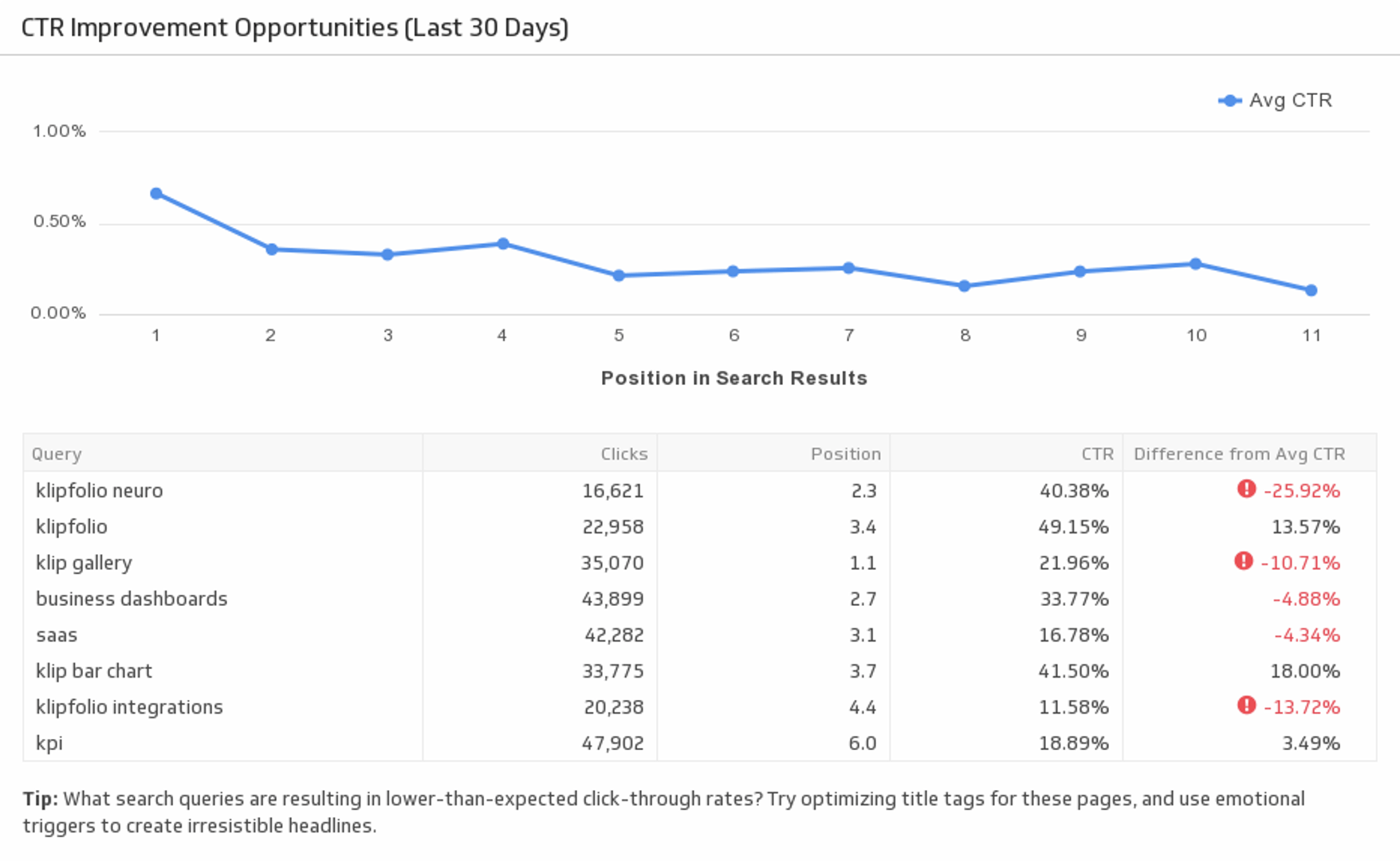
CTR Improvement Opportunities (Last 30 Days)
Improve your click-through rate by evaluating your organic keyword performance. This pre-built metric allows you to analyze different keyword rankings and shows you which areas to improve on.
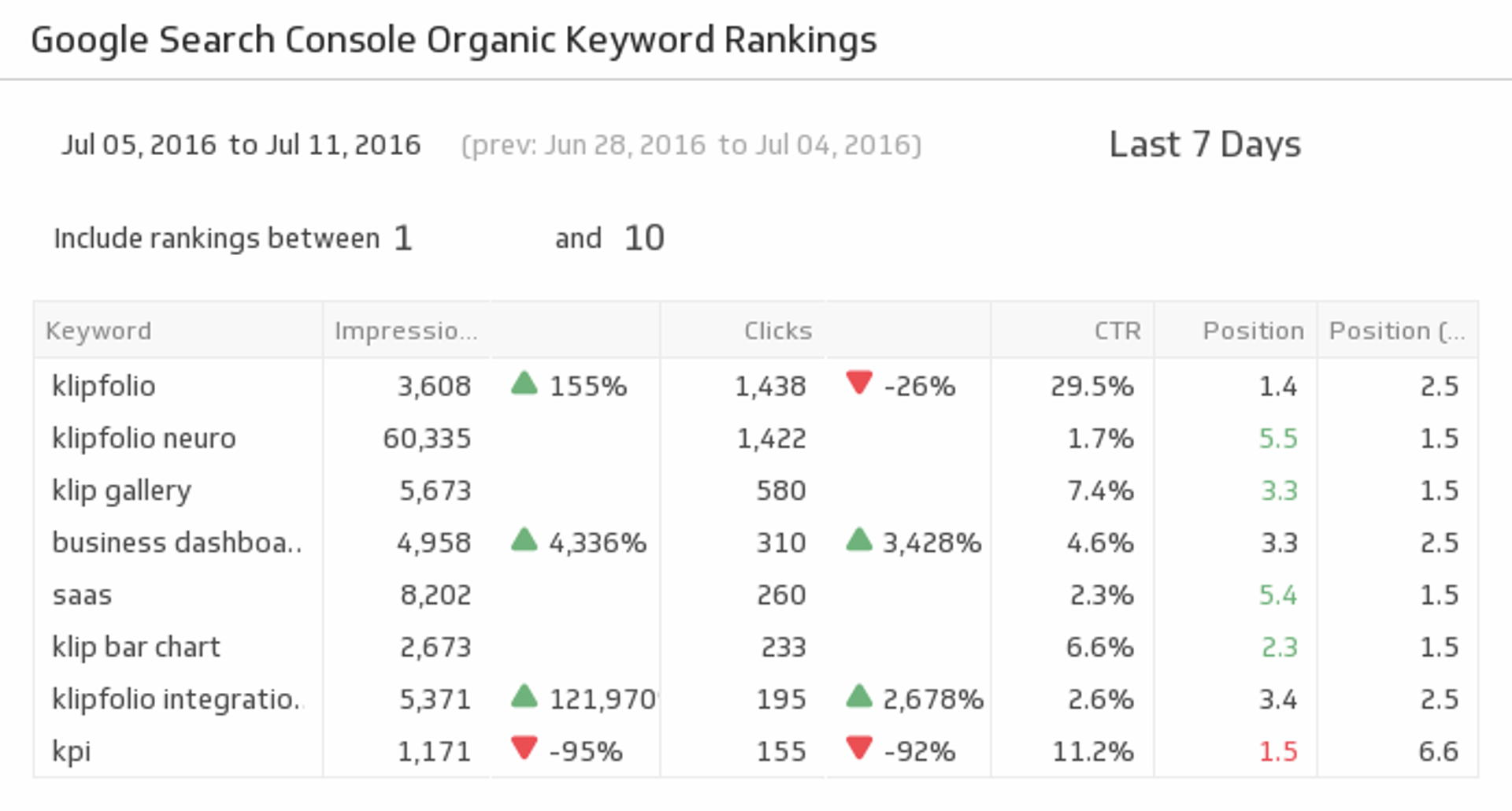
UsesOrganic Keyword Rankings
Are your SEO efforts paying off? This pre-built metric gives you the organic keyword rankings data you need to evaluate your performance and make proper adjustments.
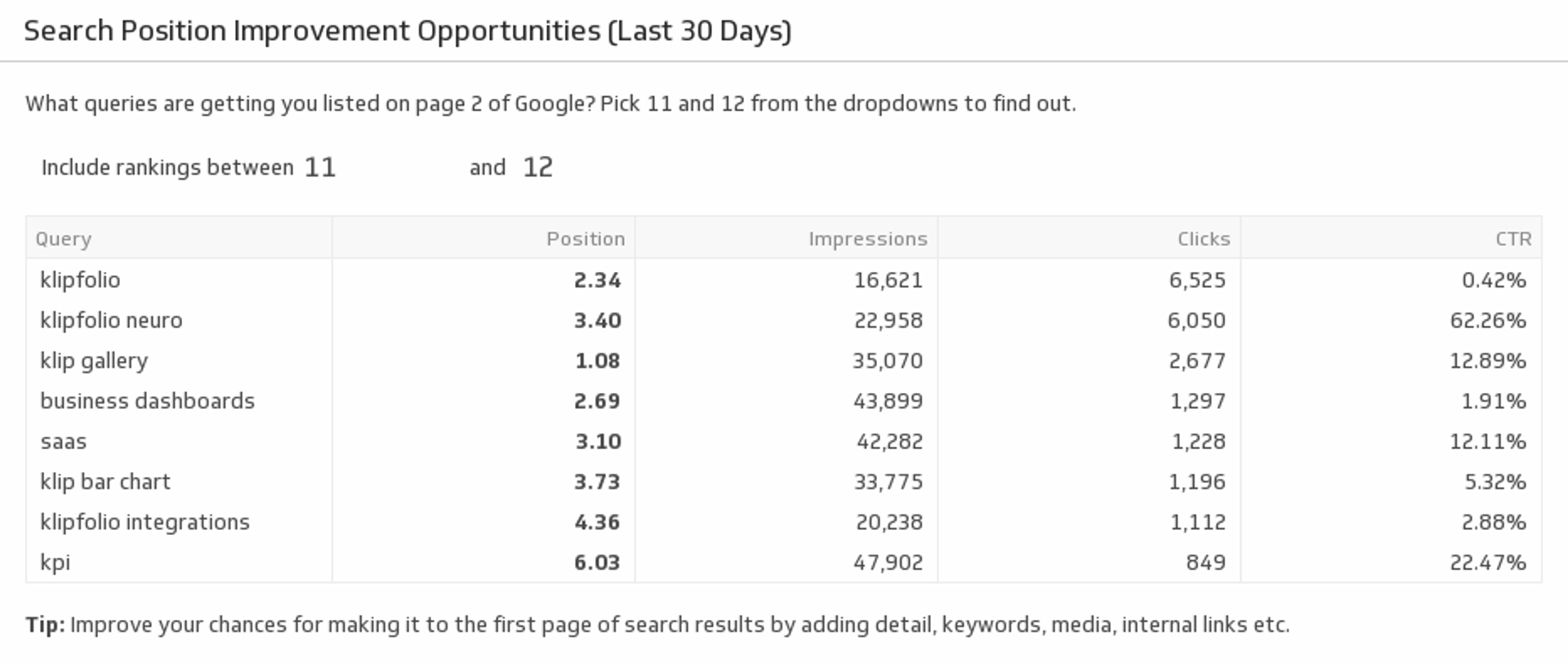
UsesSearch Position Improvement Opportunities (Last 30 Days)
Which search queries can you improve on? Use this pre-built metric to find your page 2 query results. Use best practice SEO tactics to improve those rankings to page one of Google.
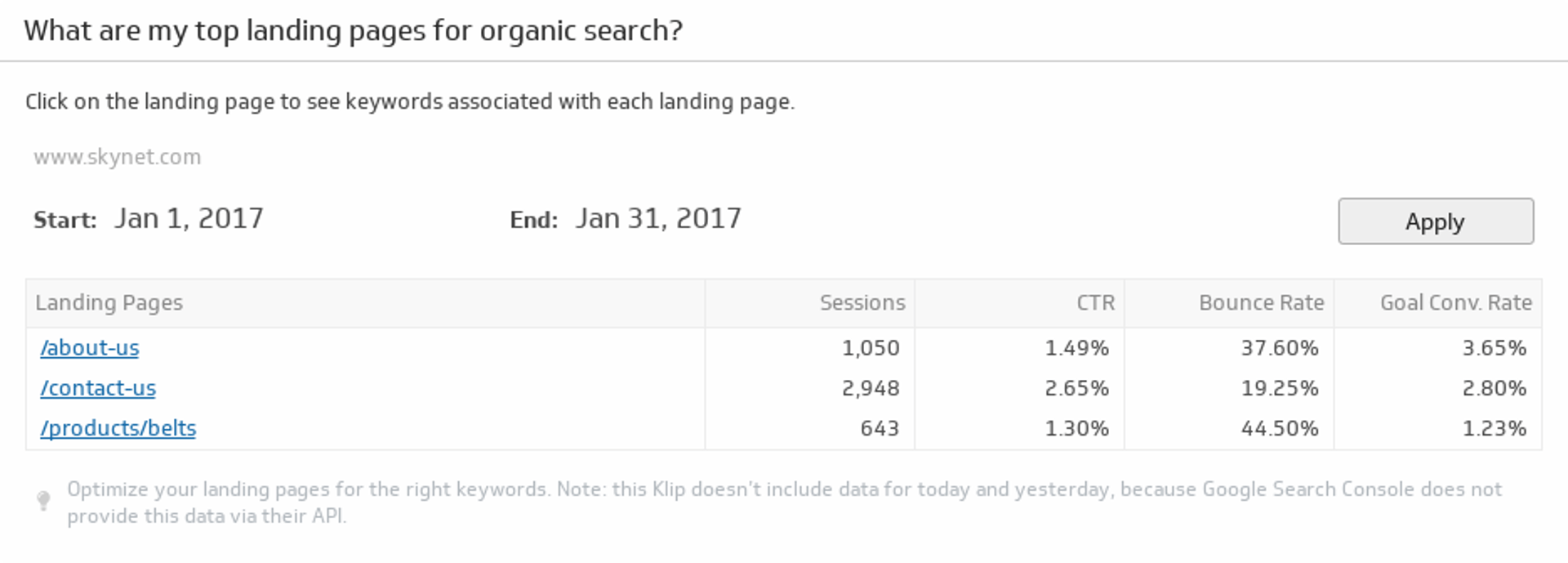
UsesTop Landing Pages for Organic Search
Monitor your top ten landing pages based on organic search traffic.
Uses